Introduction
Hi, I’m Luna. Born in Vilnius, fed on spicy soups and stubborn opinions about what makes real food, I treat a slow cooker like a DJ treats a set list: it needs rhythm, balance, and a few surprises. In 2026 the kitchen market is all about easy, fun at-home experiences. People want to press a button, put music on, and trust dinner will arrive warm and good.
Quick Recipes are the quiet magic of weeknights: fast to plan, slow to enjoy.
Digital recipe libraries and smart app integrations mean you can discover new meals without leaving your couch.
Set and forget weeknight meals finally feel like a small luxury, not a compromise.
This guide looks at the best mix of hardware and apps for Quick Recipes: smart slow cookers, solid programmable pots, and the recipe libraries and apps that make cooking simple. I’ll tell you who each pick is best for, what cleanup really feels like, and how these pieces play together when you want dinner on the table with minimal fuss.
Instant Pot Smart WiFi 6-Quart
Why This One Made The List
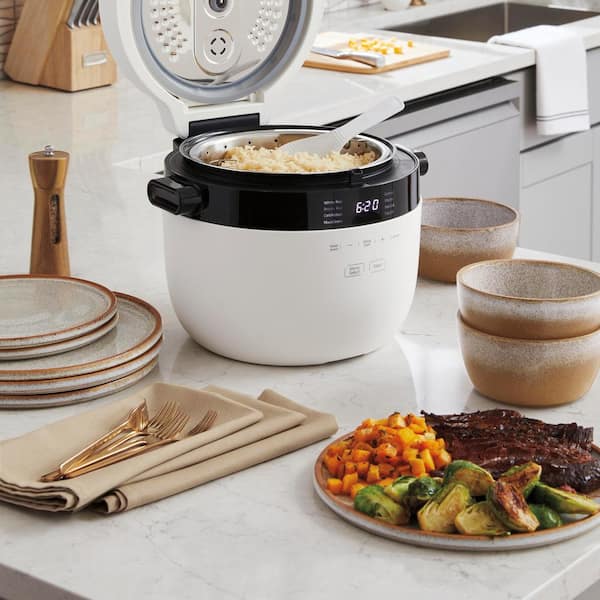
Best for cooks who want a single pot that doubles as a slow cooker and a connected recipe hub. It pairs with a large recipe library and supports Quick Recipes with remote controls.
Description
The Instant Pot Smart WiFi smells like simmering stock when it works overnight, and it keeps counter space tidy compared to juggling pans. Speed-wise it is forgiving - start a stew in the morning and it will be ready by dinner. The app sync lets you pull Quick Recipes from a library and control timing from your phone.
Quick Specs
- Capacity: 6 quarts
- Temp control style: Buttons plus app remote control
- What it’s best at: Quick Recipes, stews, multi-cook functions
- Cleanup difficulty: Medium (inner pot dishwasher safe)
- Warranty: 1 year
- Versatile cooker - replaces several appliances, so less clutter.
- Strong recipe library in the app for Quick Recipes and weeknight meals.
- Remote control - start or adjust cooks while you DJ or commute.
- Good sealing for low evaporation and richer flavors.
- Inner pot is usually dishwasher safe.
- App connectivity can be finicky in busy Wi-Fi environments.
- Learning curve for all the functions if you want to use them all.
- Bulkier than a basic slow cooker if counter space is tight.
What It’s Like To Use
- Weeknight Quick Recipes: toss in spices, press a recipe on the app, forget it - dinner arrives on time.
- Meal prep Saturdays: batch-cook soups and store in fridge or freezer.
- Small dinner party: use slow cooker mode for a shared stew and allow social time.
- Holiday counter space reality: I clear one shelf for it and leave it there for the season.
My experience: I’d pay extra for easier cleanup, but the app recipes saved me several 'what am I making' panics.
Care And Cleaning
- Unplug and let the pot cool after use.
- Remove the inner stainless pot and wash with warm soapy water or place in dishwasher.
- Wipe the lid and sealing ring; soak the ring if it has strong odors.
- Wipe the base housing with a damp cloth; do not submerge.
- Dry components fully before reassembly to prevent smells.
Common Problems And Easy Fixes
- App won't connect - restart the router and the pot, then re-pair in the app.
- Food sticks - add a touch more liquid or use oil to reduce sticking.
- Strong smells in ring - soak it in vinegar and baking soda for 15 minutes.
- Overcooking on delay - use less salt in recipes saved to delay and adjust cook time manually.
Mini Comparison
| Model | Who It’s For | Best Use |
|---|---|---|
| Instant Pot Smart WiFi | Busy cooks who like multi-use tools | Quick Recipes and meal prep |
| Hamilton Beach Set n Forget | Traditional slow cooker fans | Large roasts and low fuss set-and-forget |
"A smart pot that actually makes weeknights more predictable is worth the counter space." - Luna, Food Editor
Real People Say
"The app recipes got me cooking things I would never try. Dinner felt fancy but it was so simple."
"Great for batch cooking. Clean up could be easier, but I still use it weekly."
Hamilton Beach Set 'n Forget Programmable Slow Cooker
Why This One Made The List
It is a classic for people who like tangible controls and probe-based cooking. It is included because it nails consistent roasts and slow-simmered Quick Recipes without fuss.
Description
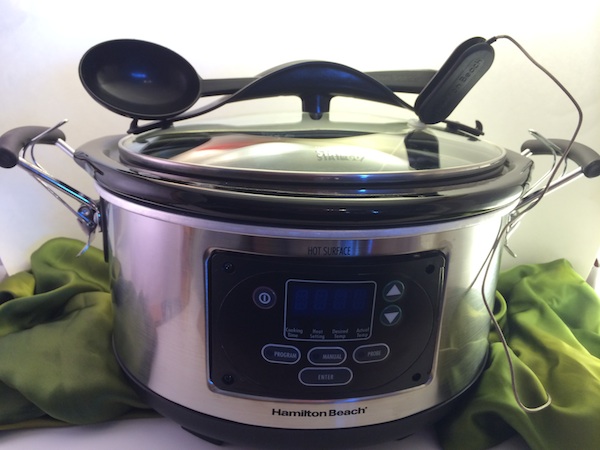
This slow cooker smells of slow-browned onions and comfortable dinners. It is more compact on the holiday counter than some multi-cookers. The probe is handy for timed roasts, and the digital timer gives peace of mind. It is not app-connected, but its predictable performance makes Quick Recipes feel reliable.
Quick Specs
- Capacity: 6 quarts
- Temp control style: Digital timer and meat probe
- What it’s best at: Roasts, pulled meat, set-and-forget dinners
- Cleanup difficulty: Medium
- Warranty: Typically 1 year
- Meat probe keeps roasts perfectly cooked.
- Simple digital timer - no app needed.
- Good capacity for family meals.
- Durable stoneware keeps heat steady.
- Great for classic Quick Recipes like braises and stews.
- No smart app features for remote control.
- Stoneware can be heavy to lift when full.
- Limited multi-function options compared to multi-cookers.
What It’s Like To Use
- Christmas Eve rush: set the probe in the roast and forget it while hosting.
- Kids party: keep pulled meat warm on low for easy sandwich service.
- Small apartment: fits well on a small counter and stores neatly.
My experience: I love the probe for meat - an underrated feature for cooks who want predictability.
Care And Cleaning
- Unplug and cool the cooker before cleaning.
- Lift out the stoneware insert and wash in warm soapy water or put in dishwasher if labeled safe.
- Remove and clean the lid; check the probe for crumbs.
- Wipe the exterior with a damp cloth and dry.
- Store the probe in a drawer to avoid damage.
Common Problems And Easy Fixes
- Probe reads high - reinsert and check placement away from bone or fat.
- Uneven cooking - ensure the lid is seated snugly and fill to recommended levels.
- Stoneware cracks - avoid sudden temperature changes; let it cool slowly.
Mini Comparison
| Model | Who It’s For | Best Use |
|---|---|---|
| Hamilton Beach Set n Forget | Traditional cooks who want precise roasts | Pulled meat and timed roasts |
| Crock-Pot Cook & Carry | People who need portability | Transporting hot meals |
"A meat probe takes the guessing out of roast night. Comfort food, but smart." - Luna, Food Editor
Real People Say
"The probe changed my roast game. No more overcooked joints."
"Simple to use and reliable for holiday meals."
Crock-Pot Cook & Carry 6-Quart Programmable
Why This One Made The List
Great for folks who bring food to parties or potlucks. It is included because it balances portability with programmable Quick Recipes for weeknight comfort.
Description
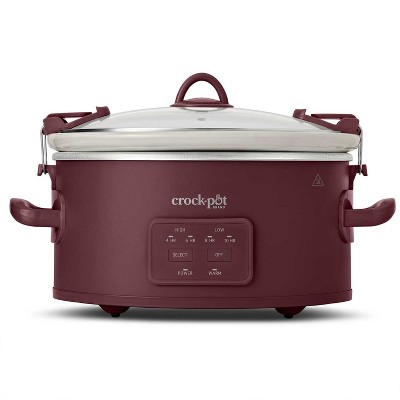
The Cook & Carry model gives off a steady, homey aroma when used for soups and chilis. It is designed for minimal mess during transport with a locking lid. Speed is standard slow cooker timing, but the portability makes it feel fast when you can just grab and go for events.
Quick Specs
- Capacity: 6 quarts
- Temp control style: Digital programmable base
- What it’s best at: Potlucks, soups, transportable Quick Recipes
- Cleanup difficulty: Easy to medium
- Warranty: Varies, commonly 1 year
- Locking lid for spill-free transport.
- Programmable timer so food is ready when you are.
- Good size for families and gatherings.
- Affordable and widely available.
- Not app-connected for remote control of Quick Recipes.
- Lid clips can wear with heavy use.
- Stoneware is heavy when full.
What It’s Like To Use
- Family gatherings: carry chili hot and ready for guests.
- Work potlucks: arrive with warm casserole and zero stress.
- Weeknight dinners: set timer in the morning and come home to a ready meal.
My experience: For bringing food to friends, this makes weeknight Quick Recipes look professional with little effort.
Care And Cleaning
- Let the stoneware cool before cleaning.
- Remove the stoneware and wash in warm soapy water or dishwasher if safe.
- Wipe the locking lid and clips; ensure they are dry before storing.
- Wipe the base with a damp cloth and dry thoroughly.
Common Problems And Easy Fixes
- Spills from clips - ensure clips snap firmly and lid gasket is clean.
- Stoneware stains - soak in warm water with baking soda to lift stains.
- Timer resets - check power cord and outlet if timer loses program.
Mini Comparison
| Model | Who It’s For | Best Use |
|---|---|---|
| Crock-Pot Cook & Carry | People who transport meals | Potlucks and family dinners |
| Instant Pot Smart WiFi | Connected kitchen fans | App-guided Quick Recipes |
"If you take food to friends, a Cook & Carry is worth it for the peace of mind alone." - Luna, Food Editor
Real People Say
"Never had a spill at a potluck since I started using this. Total game changer."
"Works exactly as promised for family dinners."
Yummly App
Why This One Made The List
Yummly is a recipe library with powerful filters for Quick Recipes and dietary needs. It earns a spot because it helps you discover new weeknight ideas and connect recipes to shopping lists.
Description
Yummly does not smell or take up counter space, but it fills your phone with useful recipe ideas. The app learns your tastes and surfaces Quick Recipes that match your calendar. It offers step-by-step guidance and a shopping list that makes dinner planning fast and efficient.

Quick Specs
- Platform: iOS and Android
- Temp control style: N/A - app-based recipe control and timers
- What it’s best at: Quick Recipes, personalized recommendations, shopping lists
- Cleanup difficulty: N/A
- Cost: Free with optional Yummly+ subscription for premium recipes
- Huge recipe library with search filters for Quick Recipes.
- Personalized recommendations based on likes and allergies.
- Built-in shopping lists and meal planning features.
- Syncs with some smart devices for guided cooking.
- Some premium recipes behind subscription.
- Recipe results can be variable in quality depending on source.
- Not all devices integrate seamlessly; check compatibility.
What It’s Like To Use
- Quick weeknight pick: filter by time, ingredients on hand, and get a Quick Recipe in minutes.
- Shopping day: build a list and check off items in the store.
- Holiday planning: save family favorites and scale recipes easily.
My experience: Yummly turned my "what’s for dinner" panic into a 3-minute search and a confident plan.
Care And Cleaning
Digital care is simple:
- Keep the app updated for best recipe recommendations.
- Clear app cache occasionally to free phone space.
- Sync and back up recipe collections to your account.
- Enable notifications for timers and shopping reminders if helpful.
Common Problems And Easy Fixes
- App not showing saved recipes - sign out and sign back in to refresh the library.
- Shopping list not syncing - check permissions for calendar and notifications.
- Recipe missing steps - look at original source link or user comments for fixes.
Mini Comparison
| App | Who It’s For | Best Use |
|---|---|---|
| Yummly | Home cooks who want fast, tailored Quick Recipes | Meal planning and shopping lists |
| SideChef | Users who want step-by-step guidance | Guided cooking and smart device sync |
"A strong recipe library makes Quick Recipes feel effortless and abundant." - Luna, Food Editor
Real People Say
"Filter by what I actually have and I'm saved. My weeknight dinners are better now."
"Yummly's shopping list is my secret weapon for less food waste."
SideChef App
Why This One Made The List
SideChef is built for guided cooking and smart integrations. It is included because it helps cooks follow Quick Recipes with confidence and can sync with selected smart appliances.
Description
SideChef offers voice and step-by-step directions that make Quick Recipes feel like a cooking class. The app reduces mistakes and keeps your hands free while you stir. It is neat for busy households or anyone who wants a little guidance without the fuss.

Quick Specs
- Platform: iOS, Android, and web
- Temp control style: App-guided directions; some smart device sync
- What it’s best at: Guided Quick Recipes, timers, step-by-step support
- Cleanup difficulty: N/A
- Cost: Free with optional premium features
- Clear step-by-step instructions for cooks of all levels.
- Voice guidance so you can keep your hands on the food.
- Smart integrations for some appliances make Quick Recipes smoother.
- Built-in timers and grocery tools simplify dinner night.
- Not every appliance is supported for direct integration.
- Premium features require a subscription for full access.
- Some users prefer less hand-holding and more freedom.
What It’s Like To Use
- Cooking with kids without chaos: voice prompts help keep steps clear.
- Trying new Quick Recipes: follow each step without pausing the music.
- Small apartment kitchens: the guided flow keeps counters cleaner.
My experience: Guided recipes make complicated ideas feel achievable on a weeknight.
Care And Cleaning
Digital care steps:
- Keep SideChef updated for new features and device support.
- Enable voice and microphone permissions for hands-free mode.
- Save favorite recipes to collections for quick access later.
Common Problems And Easy Fixes
- Voice commands not working - check app permissions and device microphone.
- Smart device not pairing - ensure both are on the same network and app supports the model.
- Steps too slow - adjust speed settings or skip to the next step manually.
Mini Comparison
| App | Who It’s For | Best Use |
|---|---|---|
| SideChef | Cooks who want guided help | Step-by-step Quick Recipes |
| Yummly | Users wanting broad libraries | Personalized recipe discovery |
"Step-by-step guidance gets more people cooking confidently at home." - Luna, Food Editor
Real People Say
"SideChef's voice prompts helped my teenager learn basic kitchen skills."
"Useful when I try new Quick Recipes-no panics, just results."
Buying Guide: How to Choose Digital Slow Cooker Apps and Libraries
Choosing the right combination of slow cooker and recipe library comes down to a few simple things: how much time you have, how much you want to tinker, and whether you need to move food around. Give each factor a score of 1-3 when comparing picks to decide quickly.
Budget ranges in plain language:
- Budget: $25 to $70 - Basic programmable slow cookers, great for simple Quick Recipes.
- Mid-range: $70 to 50 - Better build, probes, larger capacity, and some smart features.
- Premium:
50+ - Multi-cookers with app integrations and large recipe libraries.Who should buy which:
- Buy cheap if you just want a set-and-forget pot for soups and basic stews.
- Choose mid if you want a probe, better timer, and family-sized capacity.
- Buy premium if you want remote controls, large recipe libraries, and app timers for Quick Recipes.
What matters most: ease of use, size for your household, cleanup, and whether you want party or gift-level results. For me, cleanup and predictable results win every time. I’d pay a bit more for a pot that cleans faster.
Seasonal tip: buy early in the holiday season. Popular models and app subscriptions can sell out or see price jumps during peak months. Also check return windows for holiday gifting.
Quick Decision Table
Need Best pick Why Simple weeknight Quick Recipes Budget programmable slow cooker Affordable and easy Remote control and recipe library Instant Pot Smart WiFi App integrations and versatile cooking Guided cooking for beginners SideChef Step-by-step support FAQ
How do I clean my slow cooker without leaving stains?
Rinse while the pot is still warm, then soak with hot water and a spoon of baking soda for 30 minutes. Use a soft scrubber for stuck bits. For tough stains, simmer a mix of water and vinegar for 10 minutes, then wash normally.Can I use app-timed recipes if my slow cooker is not smart?
Yes. Use the app for recipes and timers manually. Follow the time and temperature guidance and set your non-smart cooker accordingly. Apps still provide ingredient lists and step-by-step instructions useful for Quick Recipes.Why does my slow cooker chocolate look dull after melting?
Dull chocolate usually means it got too hot or had water introduced. For glossy melts, use low heat and stir constantly, or melt gently using a small pan inside the cooker to keep temperatures even for Quick Recipes involving chocolate.Can I do this with kids without chaos?
Yes. Use guided apps like SideChef and assign simple tasks like measuring spices or stirring. Keep knives and hot surfaces supervised. Voice prompts and timers help keep everyone on track for family Quick Recipes.How do I avoid wasting purchased ingredients?
Plan with the app shopping list and choose recipes that share ingredients. Freeze extra portions and reuse bases like stock. Pick Quick Recipes that scale easily to match what you already have on hand.What if my smart app recipe timing seems off?
Check your cooker model and any known app-device pairings. Apps give general times; adjust based on your pot’s performance and your altitude. Test with a small batch and note adjustments for next time.Are recipe library subscriptions worth it?
If you love variety, yes. Subscriptions often unlock premium Quick Recipes, shopping lists, and meal plans that save time. If you only cook once in a while, free versions may be enough.Can smart slow cookers save energy compared to stovetop cooking?
Generally yes. Slow cookers run at low wattage for longer periods and keep heat contained, which often uses less energy than long stovetop or oven use for similar results. They are efficient for Quick Recipes that cook slowly.How can I make sure recipes are safe when using delayed start?
Use fresh ingredients and follow the app’s guidance for delay-safe recipes. If the recipe involves dairy or delicate proteins, avoid long delay starts. Many Quick Recipes are written to be delay-safe, but read notes carefully.Do apps help reduce cleanup time?
Yes. Apps often suggest one-pot Quick Recipes and offer tips like lining the pot or using parchment to cut down on scrubbing. They also recommend recipes that minimize pans and bowls used.Conclusion
Smart apps and reliable slow cookers make Quick Recipes feel less like a chore and more like a ritual. Whether you want the convenience of an Instant Pot Smart WiFi, the predictability of a Hamilton Beach probe, or the guidance of Yummly and SideChef, there is a setup that fits your life.
Best for beginners: SideChef for guided cooking and confidence.
Best for parties: Crock-Pot Cook & Carry for safe, portable hot dishes.
Best for gift-level results: Instant Pot Smart WiFi for versatility and app recipes.
Try this tonight: pick one Quick Recipe from a library, prep in the morning, and let the pot finish while you play your favorite setlist. Dinner will be done and you will still have time to enjoy the table.
- Premium: